这一节,我们来给Agent增加一个钩子(Hook)功能,来让我们在Agent的不同阶段执行一些自定义的逻辑。
在Agent的生命周期中,我们可能会有一些特定的时刻需要执行一些额外的逻辑,比如在每次调用模型之前记录日志,或者在模型返回结果后进行一些后处理。为了实现这个功能,我们引入一个钩子系统。一般比较常用的钩子有:
- session:start - 新的Agent会话开始时触发
- session:end - 在Agent会话结束时触发
- user:prompt - 在用户提交提示时触发
- tool:before - 在调用工具前触发
- tool:after - 在调用工具后触发
- sub-agent:stop - 在子智能体停止时触发
- agent:stop - 在Agent停止时触发
- error - 在Agent会话期间发生错误
这里我们以tool:before和tool:after为例,来看看如何实现这个钩子系统。
首先,我们需要在Agent类中定义一个钩子系统。我们可以创建一个HookBus类来管理所有钩子和监听器:
1
2
3
4
5
6
7
8
9
10
11
12
13
14
15
16
17
18
| export class HookBus {
private listeners = new Map<EventName, Listener[]>();
on(event: EventName, fn: Listener) {
if (!this.listeners.has(event)) {
this.listeners.set(event, []);
}
this.listeners.get(event)!.push(fn);
}
async emit(event: EventName, data: any) {
const fns = this.listeners.get(event);
if (!fns) return;
for (const fn of fns) {
await fn(data);
}
}
}
|
接着,我们来动态监测并收集这些钩子:
1
2
3
4
5
6
7
8
9
10
11
12
13
14
15
16
17
18
19
20
| const getAllHooks = async () => {
const __dirname = path.dirname(fileURLToPath(import.meta.url));
const hooksDir = path.join(__dirname);
const hookFiles = fs.readdirSync(hooksDir).filter(file => file.endsWith('.hooks.ts'));
return Promise.all(
hookFiles.map(async (file) => {
const mod = await import(pathToFileURL(path.join(hooksDir, file)).href);
return mod.default;
})
);
}
export const registerHooks = async () => {
const hookModules = await getAllHooks();
for (const hookModule of hookModules) {
hookModule(hooks);
}
}
|
然后,我们在合适的时机调用这些钩子:
1
2
3
4
5
6
7
8
9
10
11
12
13
14
15
16
17
18
19
20
21
22
23
|
while (true) {
while (reply.tool_calls && reply.tool_calls.length > 0) {
for (const tc of reply.tool_calls) {
hooks.emit('tool:before', { toolCall: tc });
const tool = findTool(tc.function.name);
const args = JSON.parse(tc.function.arguments);
const result = await tool!.execute(args);
hooks.emit('tool:after', { toolCall: tc, result });
}
}
}
|
现在,我们创建一个简单的钩子来测试一下:
1
2
3
4
5
6
7
8
9
10
11
12
13
14
|
import type { HookBus } from './index.js';
export default (hooks: HookBus) => {
hooks.on('tool:before', async (data) => {
const { toolCall: tc, result } = data;
console.log(` [工具调用] ${tc.function.name}(${tc.function.arguments})`);
});
hooks.on('tool:after', async (data) => {
const { toolCall: tc, result } = data;
console.log(` [工具] ${tc.function.name}(${tc.function.arguments}) -> ${result}`);
});
}
|
来看看最终效果:
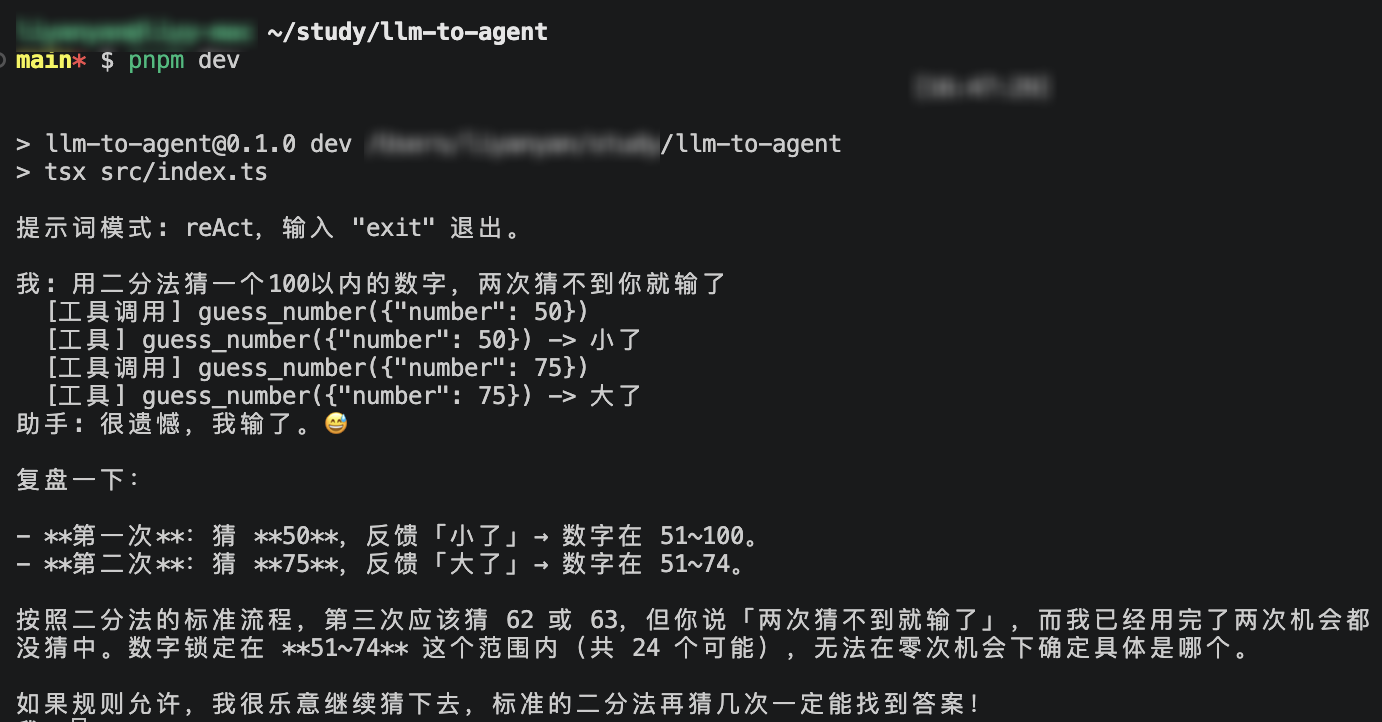
通过这个钩子系统,可以极大的增强Agent的可扩展性和灵活性,我们可以在不修改核心逻辑的情况下,轻松地添加各种自定义功能。而且我们使用了动态加载的方式来管理钩子,这样就可以非常方便地添加和删除钩子模块,非常适合后期不断迭代和优化Agent的需求。
但是,这个实现还是非常基础的,实际应用中可能还需要考虑更多的细节,比如钩子执行的顺序、错误处理、性能优化等问题,现在这个版本也没有能力对整个流程进行干扰(比如在某个钩子中修改工具调用的参数或者结果),先留个悬念,后续版本会进一步完善。