上一节我们通过不同的系统提示词,感受了提示词对模型行为的巨大影响,但到目前为止,模型还只停留在动嘴的阶段。这节我们来给模型则增加工具调用的能力,让模型能够动嘴又动手。
开始正题之前,我们新增一个新的agent人设,它的设定是你是一个有工具调用能力的助手。当需要查询信息或执行计算时,请使用提供的工具。如果不需要工具,直接回答即可。回答简洁。,本节内容将基于这个人设来演示工具调用的能力。
我们先来实现一个查询天气的工具,文件路径src/tools/weather.ts:
1
2
3
4
5
6
7
8
9
10
11
12
13
14
15
16
17
| export const weatherTool = {
name: 'get_weather',
description: '获取指定城市的当前天气信息',
parameters: {
type: 'object',
properties: {
city: { type: 'string', description: '城市名称,如"北京"、"上海"' },
},
required: ['city'],
},
execute: async (args) => {
const weathers = ['晴', '多云', '小雨', '阴天'];
const picked = weathers[Math.floor(Math.random() * weathers.length)];
return `城市:${args.city},天气:${picked},温度:${Math.floor(Math.random() * 15 + 15)}°C`;
},
};
|
再注册一个计算器工具,文件路径src/tools/calculator.ts:
1
2
3
4
5
6
7
8
9
10
11
12
13
14
15
16
17
18
19
20
| export const calculatorTool: Tool = {
name: 'calculate',
description: '执行数学计算,支持加减乘除和括号',
parameters: {
type: 'object',
properties: {
expression: { type: 'string', description: '数学表达式,如"2+3*4"' },
},
required: ['expression'],
},
execute: async (args) => {
try {
const result = eval(args.expression);
return `${args.expression} = ${result}`;
} catch (e: any) {
return `计算错误: ${e.message}`;
}
},
};
|
让后我们再定义一个工具管理工具,文件路径在src/tools/registry.ts。
这个管理工具负责注册和查找所有可用的工具,并提供给模型调用。
1
2
3
4
5
6
7
8
9
10
11
12
13
14
15
16
17
18
19
20
21
22
23
24
| import { weatherTool } from './weather.js';
import { calculatorTool } from './calculator.js';
import { Tool } from '../types/index.js';
const tools: Tool[] = [weatherTool, calculatorTool];
export function getTools(): Tool[] {
return tools;
}
export function getOpenAITools() {
return tools.map((t) => ({
type: 'function' as const,
function: {
name: t.name,
description: t.description,
parameters: t.parameters,
},
}));
}
export function findTool(name: string): Tool | undefined {
return tools.find((t) => t.name === name);
}
|
接下来,我们需要在llm.ts中接收工具并附加到请求里:
1
2
3
4
5
6
7
8
9
10
11
12
| export async function chat(
messages: { role: string; content: string }[],
tools?: any[]
) {
const response = await client.chat.completions.create({
model: 'deepseek-v4-pro',
messages: messages as any,
temperature: 0.7,
...(tools && { tools }),
});
return response.choices[0]!.message!;
}
|
然后在主入口中增加工具使用的逻辑:
1
2
3
4
5
6
7
8
9
10
11
12
13
14
15
16
17
18
19
20
21
22
23
24
25
26
27
28
29
30
31
32
33
34
35
36
37
38
39
40
41
|
while (true) {
const userInput = await rl.question('我: ');
if (userInput.toLowerCase() === 'exit') break;
context.add({ role: 'user', content: userInput });
const tools = getOpenAITools();
let reply = await chat(context.getMessages(), tools);
if (reply.tool_calls && reply.tool_calls.length > 0) {
context.add({ role: 'assistant', content: '', tool_calls: reply.tool_calls } as any);
for (const tc of reply.tool_calls) {
const tool = findTool(tc.function.name);
const args = JSON.parse(tc.function.arguments);
const result = await tool!.execute(args);
console.log(`[tools] ${tc.function.name}(${tc.function.arguments}) -> ${result}`);
context.add({
role: 'tool',
tool_call_id: tc.id,
content: result,
} as any);
}
reply = await chat(context.getMessages(), tools);
}
console.log('助手:', reply.content);
context.add({ role: 'assistant', content: reply.content! });
}
|
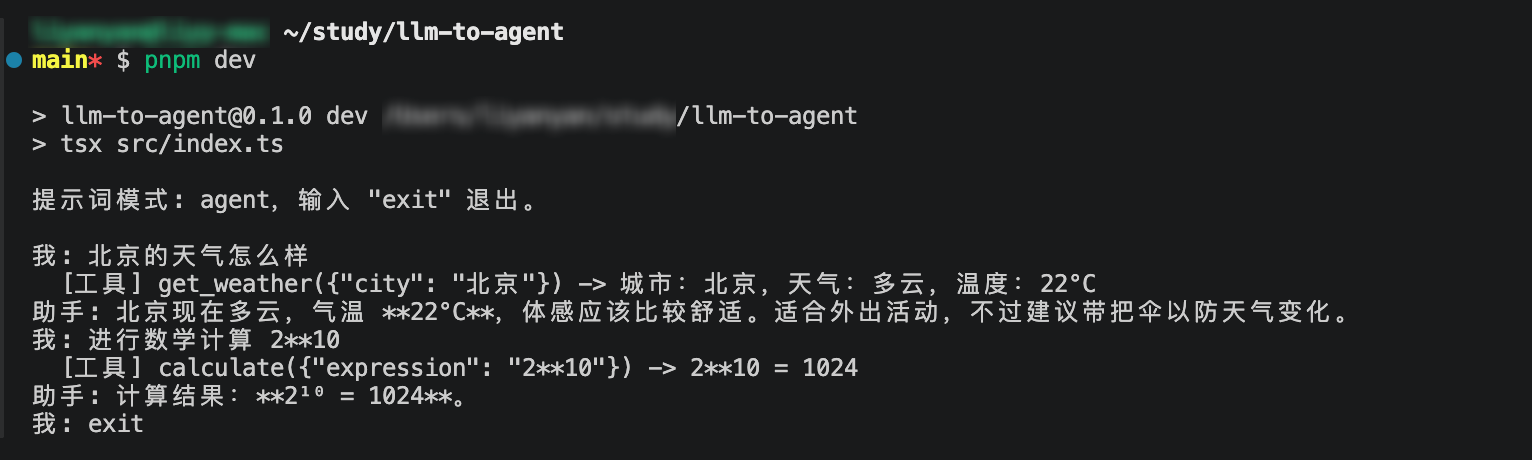
现在agent会处理模型的工具调用请求。每当模型请求调用工具时,我们就执行对应的工具函数,并把结果以 tool 消息的形式加入上下文,然后继续调用模型,模型会基于工具调用结果给出新的回答。
最后我们来看看实际效果:
发散点:
- 模型返回的工具参数合法性检查
- 工具执行的权限控制和安全性考虑
- 工具之间的依赖性管理
- 需要多轮次调用工具的情况