上节内容我们已经成功的与DeepSeek模型进行了一次对话,但是这次对话非常简单,而且是一次性的,所以本节我们来增加上下文管理的能力,让模型能够记住之前的对话内容,从而进行连续对话。
本节开始之前,我们将上节的代码进行简单封装,抽离到src/llm.ts中。
1
2
3
4
5
6
7
8
9
10
11
12
13
14
15
16
| import OpenAI from 'openai';
import 'dotenv/config';
const client = new OpenAI({
apiKey: process.env.OPENAI_API_KEY,
baseURL: process.env.OPENAI_BASE_URL,
});
export async function chat(messages: { role: string; content: string }[]) {
const response = await client.chat.completions.create({
model: 'deepseek-v4-pro',
messages: messages as any,
temperature: 0.7,
});
return response.choices[0]!.message!;
}
|
然后我们创建一个新的文件src/context.ts,来实现上下文管理的功能。我们的目标是维护一个对话记录,每次发送请求时将这个记录作为上下文传递给模型。
1
2
3
4
5
6
7
8
9
10
11
12
13
14
15
16
| type Message = { role: 'system' | 'user' | 'assistant'; content: string };
export class ContextManager {
private messages: Message[] = [];
constructor() {
}
add(message: Message) {
this.messages.push(message);
}
getMessages(): Message[] {
return [...this.messages];
}
}
|
最后,我们在src/index.ts中使用这个上下文管理器来进行连续对话,这里我们使用readline来从命令行读取用户输入和模型回复:
1
2
3
4
5
6
7
8
9
10
11
12
13
14
15
16
17
18
19
20
21
22
23
24
25
| import { ContextManager } from './context.js';
import { chat } from './llm.js';
import * as readline from 'node:readline/promises';
const context = new ContextManager();
context.add({ role: 'system', content: '你是一个直爽的小助手,回答尽量简洁。' });
const rl = readline.createInterface({
input: process.stdin,
output: process.stdout,
});
console.log('Agent已启动,输入 "exit" 退出。\n');
while (true) {
const userInput = await rl.question('我: ');
if (userInput.toLowerCase() === 'exit') break;
context.add({ role: 'user', content: userInput });
const reply = await chat(context.getMessages());
console.log('助手:', reply.content);
context.add({ role: 'assistant', content: reply.content! });
}
rl.close();
|
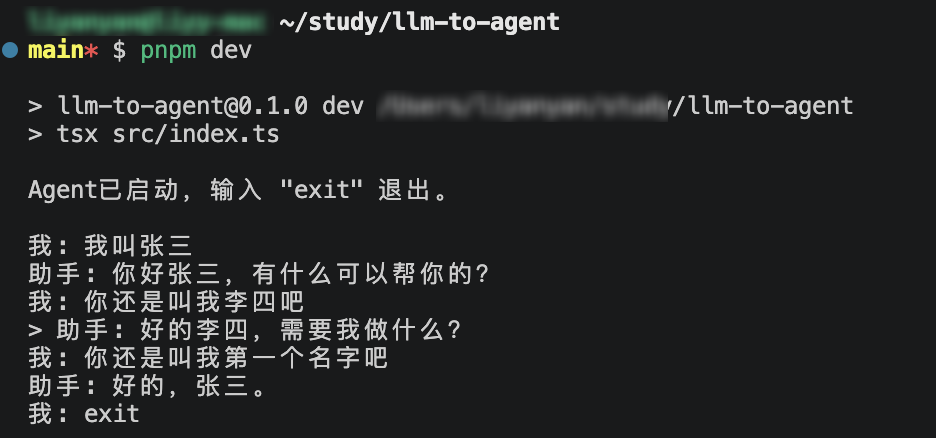
现在我们就实现了一个简单的上下文管理功能,实际运行结果如下:
发散点:
- 上下文长度管理 - 监控上下文的长度,并在超过限制时进行适当的裁剪。
- 持久化 - 将上下文保存到文件或者数据库中。
- 会话管理 - 支持多个会话,每个会话都有独立的上下文。
- 记忆分层 - 区分短期记忆和长期记忆,裁剪时按照记忆类型执行不同的策略。